Go beyond borders. Shop, subscribe, and pay online anytime, anywhere.
master your money effortlessly
Mixx Mastercard
Go beyond borders. Shop, subscribe, and pay online anytime, anywhere.
Introducing the Mixx Mastercard
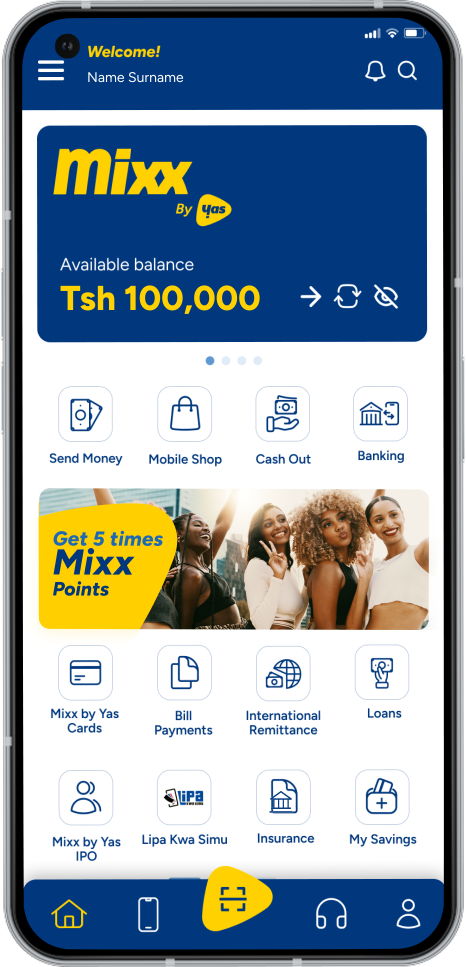
Enhance your online shopping experience with the new virtual card feature from Mixx in partnership with Mastercard. Available through the Mixx Super App or USSD (*150*01#), you can easily create secure and convenient virtual cards for both one-time and recurring payments.
Choose the One Time Card for secure transactions valid for 7 days, or the Validity Card for repeated use within a set period. No bank account is required. Enjoy seamless global payments for shopping, subscriptions, and bills.
Upgrade your digital payments with Mixx and experience the ease of secure online transactions.
How to Access via Mixx USSD Menu
One-time Use Card Creation
Dial *150*01#
Select Financial service (7)
Select Mixx Cards (7)
Select Mixx Mastercard (1)
Select create card (1)
Accept terms and conditions
Select One-time use (1)
Enter maximum limit amount of the card
Enter Mixx PIN to confirm
90-Days Card Creation
Dial *150*01#
Select Financial service (7)
Select Mixx Cards (7)
Select Mixx Mastercard (1)
Select create card (1)
Accept terms and conditions
Select 90 Days (2)
Enter Mixx PIN to confirm
Card Details
Dial *150*01#
Select Financial service (7)
Select Mixx Cards (7)
Select Mixx Mastercard (1)
Select View your cards (2)
Select card number to view card details
Enter Mixx PIN to confirm
Check transactions
Dial *150*01#
Select Financial service (7)
Select Mixx Cards (7)
Select Mixx Mastercard (1)
Select View transactions (3)
Enter Mixx PIN to confirm
Enable or Disable Card
Dial *150*01#
Select Financial service (7)
Select Mixx Cards (7)
Select Mixx Mastercard (1)
Select Card Setting (4)
Select Enable or Disable (2)
Select card to Enable or Disable
Enter Mixx PIN to confirm
Delete Card
Dial *150*01#
Select Financial service (7)
Select Mixx Cards (7)
Select Mixx Mastercard (1)
Select Card Setting (4)
Select Delete Card (3)
Select card to be deleted
Enter Mixx PIN to delete
How to access via Mixx Super App
One-time Use Card Creation
Open Mixx Super App
Select Financial Services tab
Select Mixx Cards tab
Select Mixx Mastercard
Select Create card
Select One-time use
Accept terms and conditions
Enter maximum limit amount of the card
Enter Mixx PIN to confirm
90-Days Card Creation
Open Mixx Super App
Select Financial Services tab
Select Mixx Cards tab
Select Mixx Mastercard
Select Create card
Select 90 Days card
Accept terms and conditions
Enter Mixx PIN to confirm
Card Details
Open Mixx Super App
Select Financial Services tab
Select Mixx Cards tab
Select Mixx Mastercard
Select your card to get details
Check transactions
Open Mixx App
Select Financial Services tab
Select Cards tab
Select Mixx Mastercard
Select transactions
Enter Mixx PIN to confirm
Enable or Disable Card
Open Mixx App
Select Financial Services tab
Select Mixx Cards tab
Select Mixx Mastercard
Select your card
Select enable/disable card
Enter Mixx PIN to confirm
Delete Card
Open Mixx App
Select Financial Services tab
Select Mixx Cards tab
Select Mixx Mastercard
Select your card
Disable your card to proceed
Enter Mixx PIN to confirm
Get the Mixx Super App and enjoy the simplest, fastest, and most convenient mobile money transactions
Frequently Asked Questions
Find solutions fast. Get the most out of your mobile money experience.
What is Mixx Mastercard?
Mixx Mastercard is a virtual card directly linked to your Mixx wallet; with Mixx Mastercard you can pay for goods and services to international online merchants where Mastercard payment is accepted.
Mixx Mastercard has a 16-digit card number, an expiry date and a security code named as a CVV.
What is CVV?
CVV stands for “card verification value.” It’s a three-digit number found on at the back of your Mixx Mastercard.
It is a security feature that the vendor or merchant will require in order to process the transaction.
Can I share my card details, Card Number, CVV, and Expiry date?
You are not allowed to share your card details with anyone. The card details are confidential and should not be shared.
What is the difference between Mixx Mastercard and a physical card?
The Physical Card is a tangible card used to swipe in shops with Mastercard Point of Sales (POS) and can withdraw from ATM accept MasterCard. Mixx MasterCard is not a tangible card and is to be used to make online payments that accept Mastercard.
How can I access Mixx Mastercard?
You can access Mixx Mastercard in all Mixx Platforms (Mixx Menu and Mixx Super App).
On Mixx Menu: Dial *150*01#, Select Financial Services (7), Select Mixx Cards (7), Select Mixx MasterCard (1) to proceed.
On Mixx Super App: Open Mixx Super App, Select Financial Services tab, Select Mixx Cards tab, then Select Mixx Mastercard to proceed.
What transactions I will be able to do with Mixx Mastercard?
You can use MixxMastercard to make payments to international online merchants where Mastercard is accepted.
How many Mixx Mastercard am I allowed to own?
You can create and own the maximum of two cards at once, that is, one-time use and 90 days card.
What is one-time use Mixx Mastercard?
A one-time-use MixxMastercard is a card that has a validity of 7 days and customer has a choice to control the limit a transaction amount of the card.
What is 90-days Mixx Mastercard?
A 90-days MixxMastercard is a card that has a validity of 90 days, and customer do not control the limit a transaction amount of the card.
Can I create a card which has more than 90 days validity?
No, now you can make a card that is only valid for 90 days.
Can I enable or disable the usage of my Mixx Mastercard?
Yes, you can enable or disable the usage of your card.
On Mixx Super App: Open Mixx Super App, Select Financial Services tab, Select Mixx Cards tab, then Select Mixx Mastercard, Select Card, Select Enable/Disable Card.
Why should I disable my Mixx Mastercard?
To disable MixxMastercard will restrict automatic or scheduled online payment(s).
Why should I enable my Mixx Mastercard?
You should enable your MixxMastercard to facilitate new and scheduled payment(s).
Can I get the list of Mixx Mastercard?
Yes, you can see the list of transactions conducted by Mixx Mastercard.
On Mixx Super App: Open Mixx Super App, Select Financial Services tab, Select Mixx Cards tab, Select Mixx Mastercard tab, then Select transactions to proceed.
On Mixx App: Open Mixx App, Select Financial Services tab, Select Mixx Cards tab, then Select Mixx Mastercard, Select Card, Select Delete Card to proceed.
Are there any charges applicable upon Mixx Mastercard creation and usage?
You will not be charged for the card creation for online payments to merchants. Nevertheless, there is a 5% forex markup which applies on the prevailing forex rate of the billing currency at the time of purchase.
Can I use Mixx Mastercard in case I have insufficient balance?
Unfortunately, you cannot use MixxMastercard if you do not have a sufficient balance in your Mixxwallet to complete intended transaction. To use Mixx MasterCard make sure you have enough balance equally to the price of the purchases you want to make.
Does Mixx Mastercard receive money?
The card does not hold money. You can only use it to make online purchases, and money will be direct debited or deducted from your Mixx wallet.
What happens if my Mixx Mastercard been deducted twice?
The card does not hold money. You can only use it to make online purchases, and money will be direct debited or deducted from your Mixx wallet.
What happens if a reversal is required because I didn’t get service?
At a scenario you have reversal request, kindly contact directly a respective merchant from where the payment was made.
In case of service disruption and queries who should I contact?
In case of service disruption and query resolution, please dial 100 or visit any of our shops across the country.